
The AI revolution has just taken another huge leap — introducing ChatGPT Atlas, OpenAI’s brand-new AI-powered web browser that blends ChatGPT directly into your browsing experience. If you’ve ever wished your browser could think with you, summarize pages instantly, write replies, and automate tasks — Atlas is here to make that real.
ChatGPT Atlas Web Browser is, how to use it, how it compares to Google Chrome, and where it fits among tools like DeepSeek AI.
What Is ChatGPT Atlas?
ChatGPT Atlas is a smart web browser built around OpenAI’s ChatGPT. Instead of having to visit chat.openai.com or open another tab to talk to the AI, Atlas is ChatGPT — your AI assistant lives in a sidebar, can read the page you’re on, and help you take action right inside your browser.
Think of Atlas as Google Chrome + ChatGPT + personal assistant combined. It can:
-
Summarize long articles instantly.
-
Rewrite or translate selected text.
-
Fill out forms or emails using AI.
-
Manage browsing “memories” to help you pick up where you left off.
-
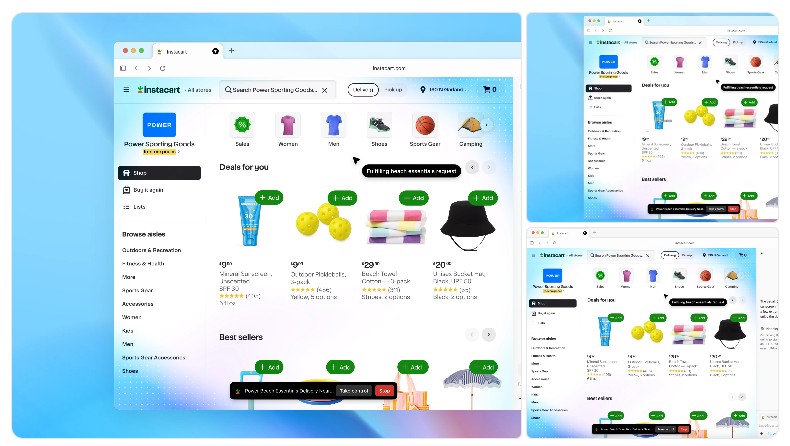
Automate multi-step tasks like trip planning or product comparisons with Agent Mode.
How To Use ChatGPT Atlas Web Browser
Here’s a step-by-step guide to start using ChatGPT Atlas effectively.
1. Download and Install
-
Visit the official page: chatgpt.com/atlas.
-
Atlas is currently available for macOS (M-series), with Windows and mobile versions on the way.
-
Download the
.dmgfile, drag it into your Applications folder, and open Atlas.
2. Sign In
-
Use your existing OpenAI / ChatGPT account (free or Plus).
-
Paid users (Plus, Pro, or Team) unlock advanced features like Agent Mode and faster responses.
3. Set as Default Browser
When prompted, make Atlas your default browser — this ensures links open directly with AI support.
You’ll even get a temporary boost in rate limits for the first few days.
4. Import Bookmarks and History
Atlas can import your bookmarks and passwords from Chrome, Safari, or Edge, so you don’t start from scratch.
5. Start Browsing with AI
-
Open any website.
-
Click the ChatGPT sidebar icon or press the shortcut (
⌘ + Shift + G). -
Ask ChatGPT to summarize, explain, or even rewrite the content you’re viewing.
💡 Example:
“Summarize this article in bullet points.”
“Find the main pros and cons mentioned here.”
“Compare this laptop to the MacBook Air.”
Key Features of ChatGPT Atlas
| Feature | Description |
|---|---|
| AI Sidebar | ChatGPT lives beside every page. Summarize, translate, rewrite, and query instantly. |
| Browser Memories | Optional “context recall” so ChatGPT remembers what you research. Fully deletable. |
| Agent Mode (Preview) | ChatGPT can act for you — open tabs, collect data, and perform tasks automatically. |
| Privacy Controls | Choose which sites the AI can read. Delete or disable memory anytime. |
| Cross-App Writing Help | Highlight text anywhere — ChatGPT can edit, improve tone, or rewrite it instantly. |
🔒 Privacy and Control
Atlas gives you total control over what ChatGPT can see and remember.
You can toggle AI visibility per site, clear browsing data, or turn memory off entirely.
Sensitive sites (like banking or medical portals) remain completely private if you disable memory for them.
ChatGPT Atlas vs Google Chrome
| Feature | ChatGPT Atlas | Google Chrome |
|---|---|---|
| Built-in AI Assistant | ✅ ChatGPT integrated | ❌ Needs extensions |
| Page Summaries | ✅ Native | ❌ Manual or plugin |
| Memory / Context Recall | ✅ Optional feature | ❌ None |
| Agent Automation | ✅ (in preview) | ❌ Not available |
| Privacy Controls | ✅ Per-site visibility | ⚠️ Limited tracking control |
| Extensions | 🔜 Coming soon | ✅ Mature ecosystem |
| Platform Availability | macOS (now), Windows soon | All major OS |
👉 Verdict:
If you live inside ChatGPT already, Atlas is the future — faster, smarter, and deeply integrated. Chrome remains better for extension power and cross-device sync, but Atlas wins for productivity and research.
DeepSeek vs ChatGPT Atlas — What’s the Difference?
Many users are comparing DeepSeek, another AI platform, with ChatGPT Atlas.
Here’s the breakdown:
| Aspect | DeepSeek | ChatGPT Atlas |
|---|---|---|
| Type | Stand-alone AI model (like ChatGPT competitor) | Full web browser powered by ChatGPT |
| Usage | Text-based chat, reasoning, coding | Integrated browsing + AI + automation |
| Browser Integration | ❌ None | ✅ Full |
| Ideal For | Developers, data scientists | Everyday users, researchers, writers |
So while DeepSeek focuses on reasoning and AI modeling, ChatGPT Atlas focuses on AI-powered browsing and workflow automation.
ChatGPT WhatsApp Number — Be Careful!
There are many fake claims online about a “ChatGPT WhatsApp number” that lets you chat with ChatGPT via WhatsApp.
⚠️ Important:
OpenAI has not released an official WhatsApp number for ChatGPT.
If you see one, it’s likely a third-party service or scam. Always use the official app or website:
For chatting on WhatsApp, you can safely use official integrations (like WhatsApp bots built by verified providers) — but not anything claiming to be “OpenAI’s official ChatGPT WhatsApp.”
Pro Tips for Using ChatGPT Atlas Efficiently
-
Use the sidebar shortcut often:
⌘ + Shift + Gopens ChatGPT on any page instantly. -
Enable Browser Memory when doing long-term research — it saves time.
-
Use Agent Mode for repetitive tasks like trip planning or price comparison.
-
Regularly clear memory if you’re privacy-conscious.
-
Check updates — OpenAI is adding new Atlas features every few weeks.
The Future of Browsing Is Here
ChatGPT Atlas isn’t just another browser — it’s a glimpse into the future of the internet.
A future where the web isn’t static, but interactive.
Where your browser doesn’t just show information — it understands it with you.
So whether you’re a researcher, writer, student, or business owner, Atlas can save hours of scrolling and searching. It truly is the “web browser to rule them all.”
📎 Useful Links
ChatGPT Atlas is more than just a web browser — it’s a revolution in how we interact with the internet. By merging OpenAI’s powerful language model directly into your browsing experience, Atlas transforms everyday web tasks into seamless, intelligent workflows. Whether you’re reading articles, conducting research, writing emails, or automating tasks, Atlas acts as your co-pilot for the web.
chatgpt atlas browser, chatgpt atlas web browser, chatgpt atlas vs google chrome, deepseek, chatgpt whatsapp number, how to use chatgpt atlas web browser, chatgpt atlas.