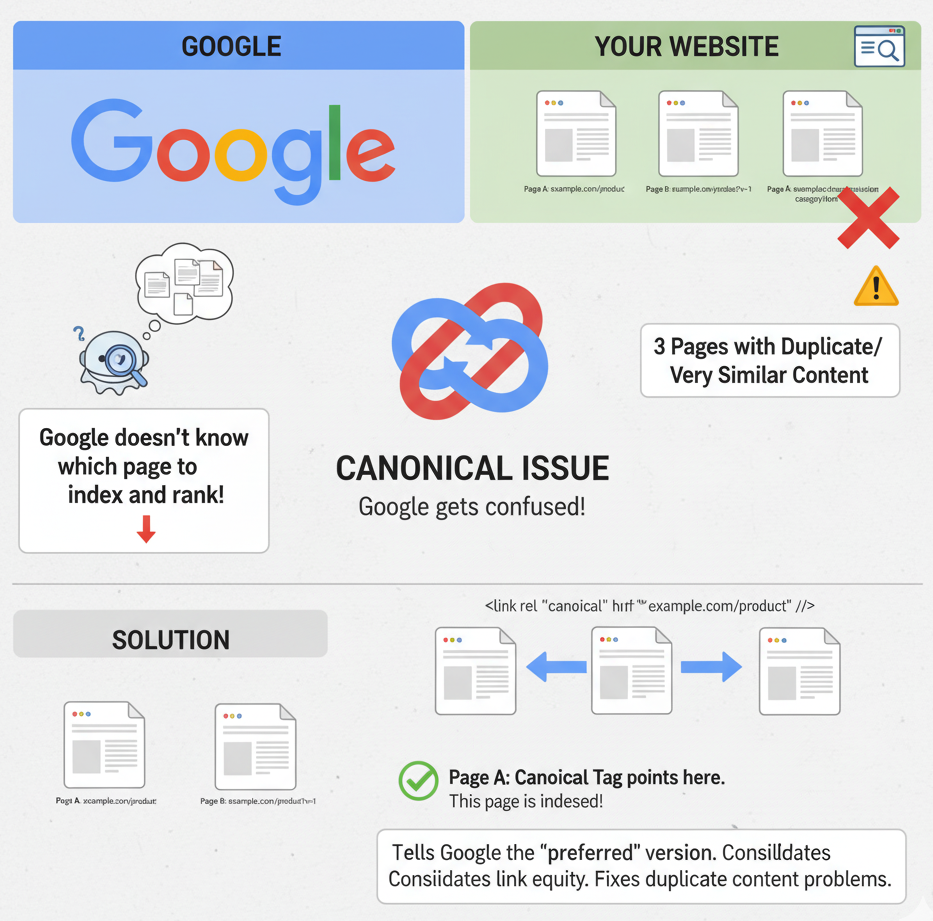
In SEO, a canonical issue occurs when a website has multiple URLs showing the same (or very similar) content and search engines are unsure which version should be considered the main one. According to Google: “Canonicalization is the process of selecting the representative – canonical – URL of a piece of content.
Why It Matters
When canonical issues exist:
-
Link equity (backlinks, internal links) can get split across multiple URLs instead of concentrated on one.
-
Duplicate or near‐duplicate content can confuse search engines, potentially causing them to index the “wrong” version or exclude versions you want ranked.
-
Crawl budget can be wasted on multiple versions of the same content rather than unique pages.
-
Ultimately this can hurt your site’s visibility and rankings.
Common Causes of Canonical Issues
Here are typical situations that lead to canonical problems:
-
HTTP vs HTTPS versions of the same page available without a clear canonical tag.
-
www vs non‐www domain variants not unified.
-
URL parameters, tracking codes or filtering (e.g.,
?utm_source=,?sort=price) creating many versions of the same content. -
CMS or e‐commerce platforms generating duplicate pages (for example product pages accessed via multiple category paths) without canonical tags.
-
Incorrect implementation of the canonical tag itself (pointing to a non‐indexable URL, redirect, 404 page, or not in the
<head>).
How to Identify Canonical Issues
To find canonical problems, you can use the following methods:
-
Use audit tools (like Screaming Frog SEO Spider, Ahrefs Site Audit) to scan for pages with missing or conflicting canonical tags, canonical chains, or canonicals pointing to error pages. Ahrefs+1
-
Check your indexed URLs in Google: Run a query like
site:yourdomain.comin search to see if unexpected URLs appear. -
In your sitemap and internal linking structure: Ensure only the preferred URLs are listed and internal links point to them.
-
Use the Google Search Console Coverage and Indexing reports: They often identify pages that Google decided have duplicates or alternate canonical versions.
How to Fix Canonical Issues
Here are best practices to resolve and prevent canonical problems:
-
Choose your preferred URL version – decide on one canonical format (e.g.,
https://www.example.com/page). -
Use
rel="canonical"tags correctly – in the<head>of duplicate pages, point to your preferred canonical URL. Only one canonical tag per page. -
Use absolute URLs in canonical tags (include protocol and domain) rather than relative URLs.
-
Ensure the canonical URL is indexable and returns HTTP 200 status – do not point to 404, redirect, or noindex pages.
-
Redirect non‐preferred versions – set up 301 redirects from old or variant URLs (HTTP → HTTPS, non‐www → www) so the canonical is the only live version.
-
Update internal links and sitemaps to point to the canonical URL exclusively.
-
Avoid canonical chains or loops – e.g., Page A → B → C is less effective than A & B → C.
-
Monitor regularly – canonical issues can creep back in when adding new site sections or changing URL structure.
Real‐World Example
Suppose you operate an e-commerce site where a product can be accessed via:
-
https://www.example.com/product/widget -
https://www.example.com/category1/widget -
https://www.example.com/category2/widget?utm_source=newsletter
Without correct canonicalization, search engines may treat each URL as a separate page, splitting link and ranking power. By setting a canonical tag on all duplicate URLs pointing to https://www.example.com/product/widget, you consolidate authority and signal to search engines which version you prefer.
Summary
Canonical issues are a technical but crucial part of SEO. They occur when multiple URLs present the same content but the search engine is unclear which one to index or rank. Left unresolved, they can dilute your ranking signals, waste crawl budget, and harm visibility.